 HUB
HUBIn one dashboard, sharing one set of data.
The dsquaredmedia Hub
Everything your website does for your business, on one page.
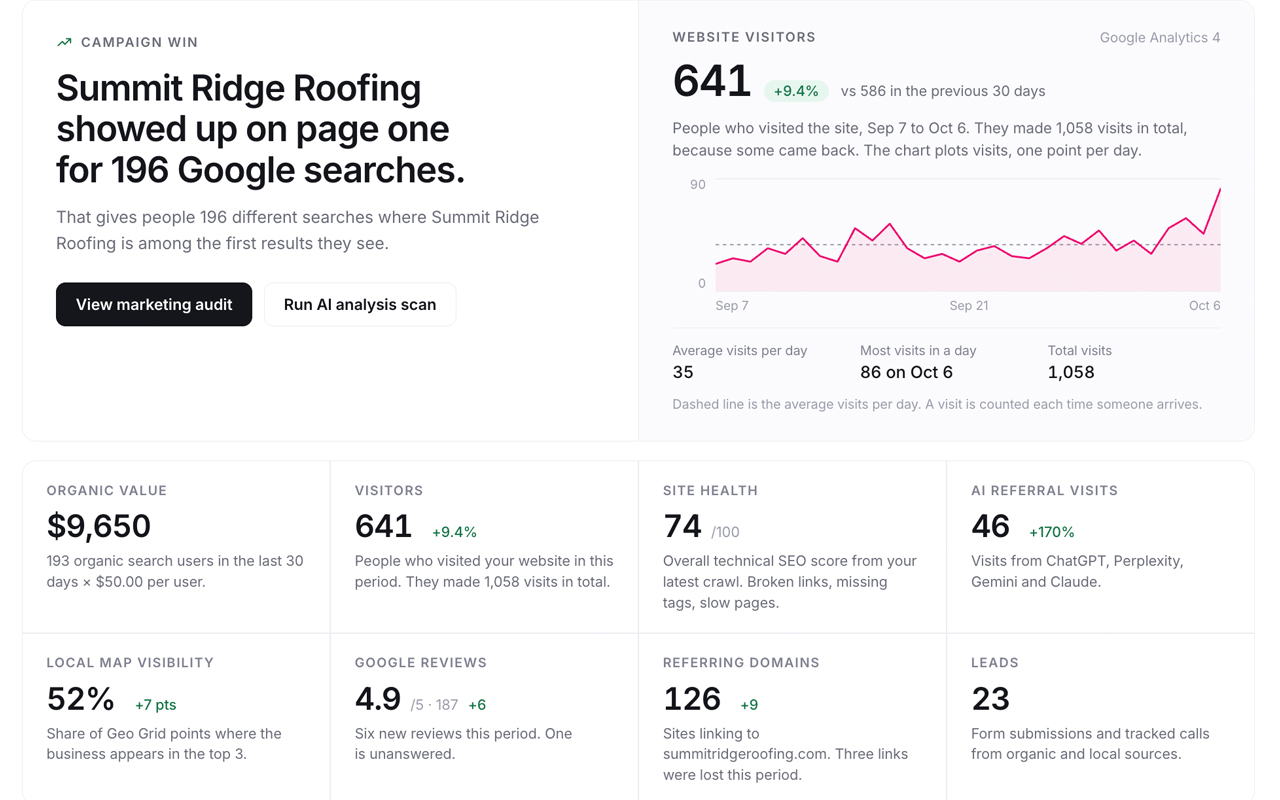
Visitors, Google rankings, local results, AI search visibility and site health, with a ranked list of what to fix next. The Hub runs the audits, drafts the content and writes the monthly report.
Connects to Google Analytics, Search Console and Google Business Profile in a few clicks.
 Example data
 Example data
 Example data
Checked for mentions of your business.
Ranked from your own marketing audit.
A report written in plain language.
What you get
Know where you stand, what to fix and who is doing it.
Know where you stand
Visitors, rankings, local results and AI mentions sit on one Overview page, with the change since last period next to every number.
Know what to fix
The marketing audit ranks every finding by expected impact, so the first thing on the list is the thing worth doing first.
Get it done
The Hub drafts content, optimizes pages, tracks tasks and writes the monthly report, so the work moves without a long email chain.
Inside the Hub
Eight tools that share one set of data.
Each tool opens from the same menu and feeds the same Overview, the same action plan and the same monthly report. These are real product screens shown with example data.
Everything that matters, on one page
Visitors, rankings, local results, AI visibility and site health in one view, with a ranked list of what to fix next.
- Eight key measures with the change since the last period
- Where your traffic comes from, by channel
- What is moving in search and what needs attention
How it works
From sign-up to your first report in three steps.
- 01
Connect your data
Link Google Analytics, Search Console and your Business Profile. The Overview shows what each connection will fill in while it waits for the first data.
- 02
Run the marketing audit
It runs for a few minutes, tells you how long is left, and emails you when it finishes. You get a ranked list of what to fix.
- 03
Improve and report
Work through the list, let the Hub draft content, and send a monthly report your clients can read without a walkthrough.
On your phone
The same Hub, built for a small screen.
Check the numbers between meetings. Every block from the desktop Overview is there, in the same order. Tables turn into readable cards, and switching between your sites takes two taps.
- Every block from the desktop Overview, in the same order
- Tables become cards with the label above each value
- Audit progress and time left show under the header
Example data
Who it is for
Made for owners, and for the people who run their marketing.
Business owners
You want to know if your website is bringing in customers, without learning marketing software.
- One page that says how the site is doing
- A short list of what to do next
- Plain-language answers, not dashboards full of jargon
- Monthly report you can forward to a partner
Agencies and marketers
You run several client sites and need the work and the reporting in one place.
- Switch between client sites in two taps
- Client view without the admin tools
- Audits that turn into assignable tasks
- White-glove monthly reports for each client
Pricing
One plan. Everything included.
Every tool in the Hub, plus 2,000 AI credits each month. Credits pay for drafts, optimizations and analysis scans, and they reset every month.
What is included
- OverviewVisitors, rankings, local, AI and site health
- LocalGeo Grids, Business Profile, reviews
- Keyword TrackerPositions and movement
- AI visibility6 AI platforms
- Backlinks and OutreachLinks and outreach
- Marketing auditRanked priorities
- Content StudioDrafts and optimizations
- Website MaintenanceSite health and fixes
- ReportsMonthly client report
- Task ManagerAssign and track work
- 2,000 AI creditsEvery month
Questions
Before you start.
Anything else, ask us and a person from Dsquared Media will answer.
What is the Hub?
A single dashboard from Dsquared Media that brings your traffic, Google rankings, local results, AI search visibility and website health together, and turns them into a ranked list of things to do.
What do I need to connect?
Google Analytics, Search Console and your Google Business Profile. Each is a one-click connection inside the Hub. Without them the page still opens and shows what each connection will fill in.
How long until I see data?
Traffic usually appears within a day. Rankings usually follow within two to three days. You can run a marketing audit straight away and get ranked priorities in a few minutes.
What are AI credits?
Credits pay for work the Hub does with AI, such as drafting content, optimizing pages and running AI analysis scans. Your plan includes 2,000 credits every month, and they reset each month.
Can I manage more than one website?
Yes. A site switcher in the menu moves between your websites. Talk to us about how many your plan should cover.
Can my clients see it too?
Yes. You can give clients access to their own site, with a view built for them: results and priorities, and none of the admin tools.
See where your website stands today.
Start with a free visibility audit, or open your dashboard and connect your data.